v1.0.2: Release
Adds Buy Plan Studio,draft supplier orders, stress-test cashflow scenarios, and track whether your Amazon inventory management plan actually delivered.
Draft orders. Test scenarios. See the outcome.
Wrath 1.0.2 gives Amazon sellers a complete operating loop — from drafting a supplier order to forecasting its cashflow impact to watching the outcome in real time.
Two new capabilities make this possible. Buy Plan Studio is the planning engine: build draft orders, stress-test quantities, and find the order combination that keeps cash working at every point in the cycle. Pulse is the intelligence layer: a live at-a-glance view of business health that tells you whether the plan is actually delivering.
Together they close the gap between intention and outcome — draft the order, understand the cashflow, execute the plan, and immediately see whether it worked.
The operating loop
Project — Draft the order. Test scenarios. Forecast the cashflow.
Perform — Confirm the order. Track payments, shipments, and stock arrival.
Outcome — Pulse scores the result. Build the next order better.
The problem this solves
Most Amazon sellers make buying decisions with missing context. Stock is running low — but is this order the best use of available cash? A supplier needs payment — but how does that land against the next Amazon payout? A product sells well — but what happens to profit and cashflow if you double the buy?
Without a proper amazon inventory management system, the pain compounds quickly:
- No clear view of when each SKU will sell out
- No way to test order quantities before committing cash
- No visibility into when Amazon cash actually becomes available
- No easy way to time supplier terms, net-30 cycles, or card billing
- No picture of what a proposed order does to year-end cash and profit
- No comparison between what you planned and what actually happened
Wrath 1.0.2 brings those pieces together.
Buy Plan Studio
Draft, test, and maximise every order
Buy Plan Studio is an inventory planner and planning workspace for building better replenishment orders — and testing them continuously before a single pound or dollar leaves the business.
The core idea: every period where you have available cash is an opportunity to put that cash to work. Buy Plan Studio helps you find the order combination that fills that window — the right SKUs, the right quantities, the right timing — so cash is never sitting idle when FBA inventory needs topping up.
Draft an order and immediately see what it does to the business. Adjust a quantity. Swap a SKU. Delay the timing by a week. Test it against the next payout cycle. Every change reruns the forecast against real account data — sales velocity, stock on hand, inbound stock, supplier costs, lead times, and order economics — and shows you the updated impact.
Whether you manage inventory across Amazon FBA, Amazon Seller Central, or multi-channel operations including eBay and Amazon, Buy Plan Studio works from a single view of your stock position.
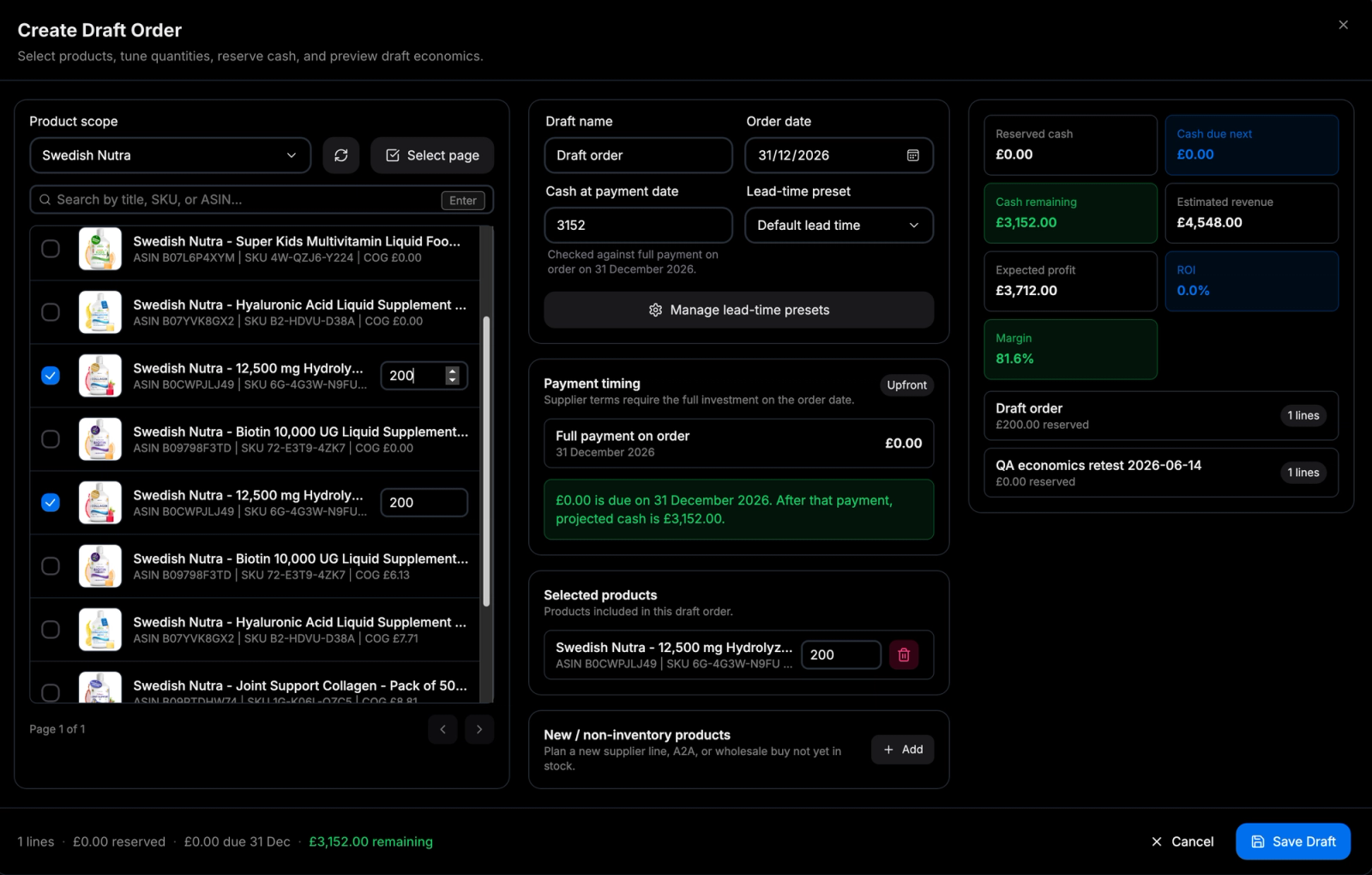
What each draft order shows you
- Expected revenue and profit impact
- Cash required and expected cash return
- Payback timing
- Stockout risk per SKU
- Year-end cash and profit direction
- Which products need action first
- Which orders are worth repeating
Scenarios you can test before committing
The most powerful change in 1.0.2 is that orders are testable before they become real commitments. You can run scenarios continuously — each one is instant, each one uses real data.
- What if I increase the buy on the fastest seller?
- What if I cut the slow-mover and redirect that cash?
- What if I delay this order until the next payout clears?
- What if I fund this on a card instead of paying upfront?
- What if I repeat this buying pattern through year end?
This turns amazon fba inventory management from a reactive chore into an experimentable workflow. You test the order before you place it.
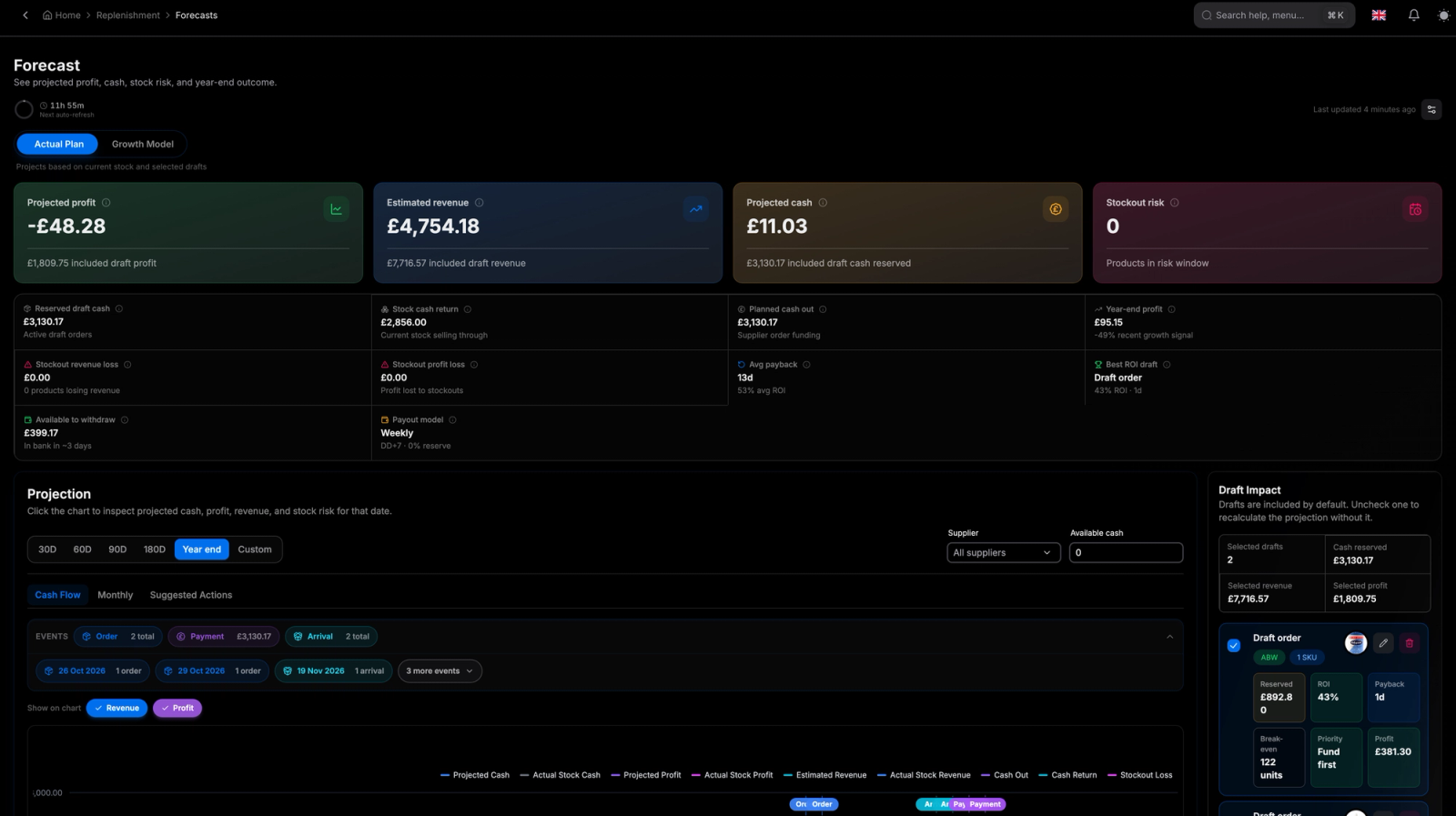
Advanced cashflow forecasting
Buy Plan Studio models the real movement of money through an Amazon business — not just revenue, but when cash is actually available to spend.
The forecast accounts for:
- Amazon payout timing and reserve holds
- Reserve release timing
- Supplier payment terms, net terms, and deposits
- Credit-card billing cycles and grace periods
- Stock arrival dates and expected cash return
- Opening cash and draft order requirements
If you fund amazon fba inventory on a card, you can time orders precisely — seeing how the billing cycle, grace period, stock arrival, sales, and Amazon payout interact before you commit. The goal is simple: know when cash goes out, know when it comes back, and decide what to do with the window in between.
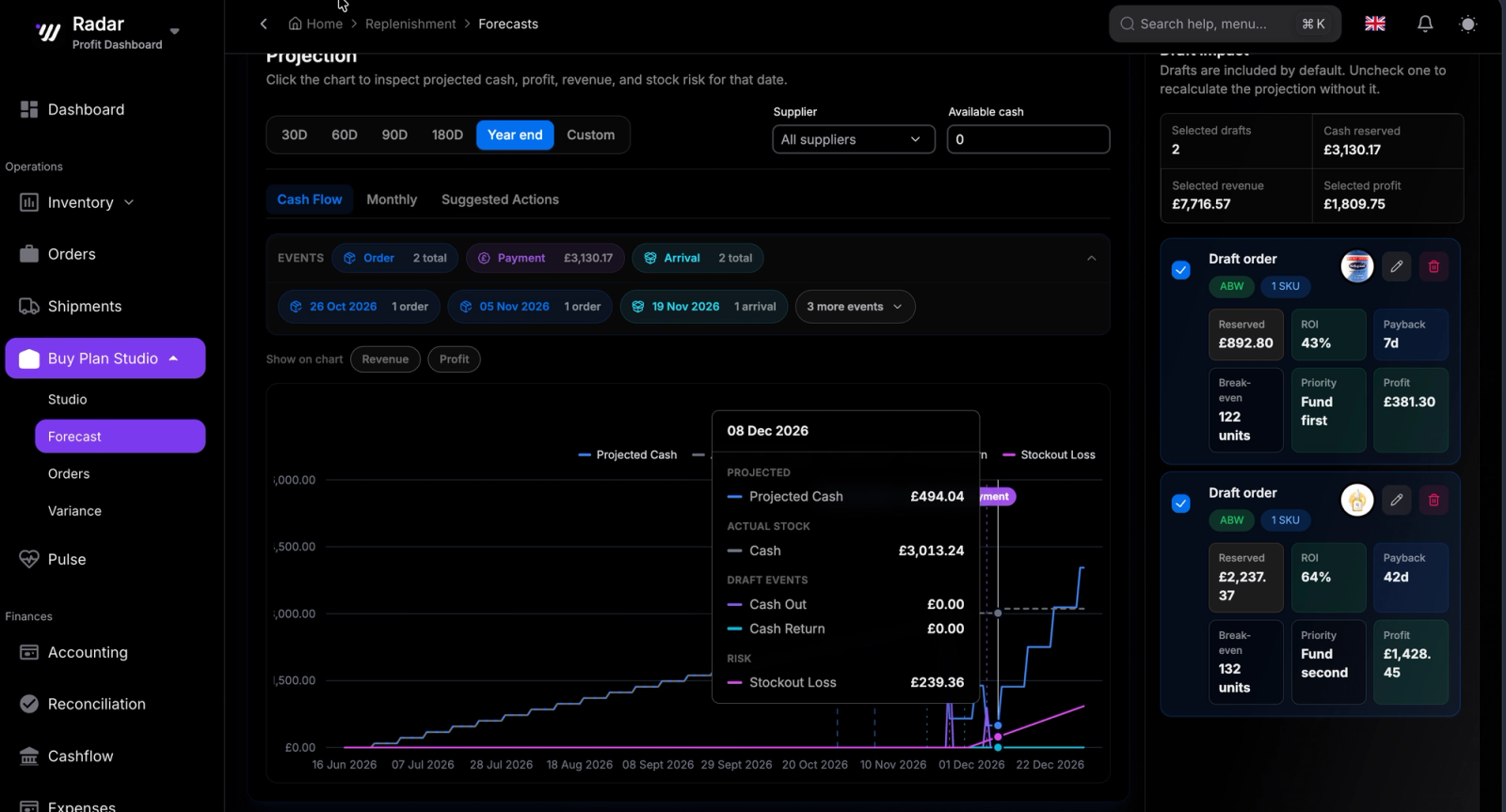
Forecast to year end
Buy Plan Studio is not just for the next order. Project the current draft plan forward and see where cash, revenue, and profit land by year end. This makes the bigger planning questions answerable:
- Which orders create the strongest return over the full year?
- Which stockouts will hurt the most — and when?
- What happens if we keep repeating this buying cycle?
- Where should we prioritise cash first?
Pulse
See the business at a glance
Pulse is the intelligence layer that sits above the plan — a single configurable view of business health that tells you whether things are actually moving in the right direction.
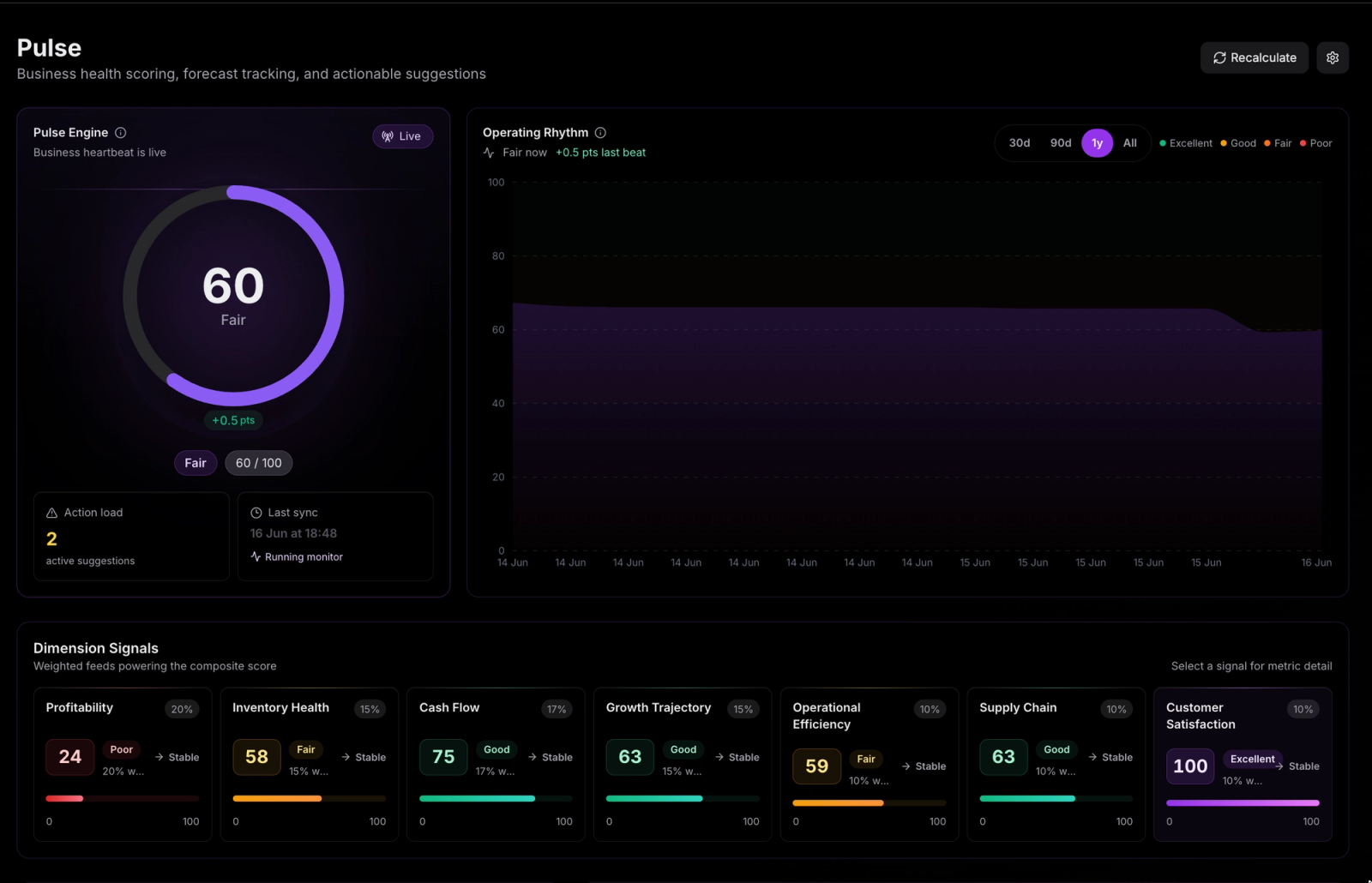
Buy Plan Studio tells you what should happen. Pulse tells you whether it did.
At the centre of Pulse is a Business Health Score built across seven dimensions:
- Profitability
- Inventory health
- Cash flow
- Growth trajectory
- Operational efficiency
- Supply chain
- Customer satisfaction
The score is highly configurable — tune weights, targets, and thresholds to match the way you run your business. Whether you optimise for cash protection, growth, or margin, Pulse surfaces the signal that matters most at a glance, without digging through reports.
Under the score, Pulse uses advanced forecasting logic and scoring models to turn your amazon inventory tracker data and account metrics into clear operating signals — so you can spot problems early and learn from each buying cycle before the next one begins.
What you can do now
- Draft supplier orders and test them before committing
- Run scenarios continuously — quantities, timing, funding method, repeat cycles
- See expected revenue, profit, and cash impact per draft order
- Forecast when SKUs sell out and when cash returns
- Model Amazon payout timing, reserves, and release dates
- Model supplier terms, net terms, deposits, and card billing cycles
- Find the order combination that keeps cash working at every available window
- Project cash, profit, and stockout risk through year end
- Convert draft plans into confirmed orders linked to shipments and POs
- Manage inventory across FBA, Seller Central, and multi-channel fulfilment from one place
- Use Pulse to track business health and compare forecast to outcome
Why this matters
Inventory is where Amazon businesses either unlock growth or trap cash. The difference is usually not what you buy — it is what you knew before you bought it.
For sellers managing amazon fba, running multi-channel operations, or scaling beyond what spreadsheets can handle, Wrath 1.0.2 provides the amazon inventory management system built around how the business actually works — the cash cycle, the payout timing, the supplier terms, the card cycles, all in one place.
Draft the order. Stress-test the scenarios. Understand the full cashflow cycle. Execute the plan. Use Pulse to see the outcome clearly.
Buy Plan Studio is the planning engine. Pulse is the intelligence layer. Together, they help you run the business forward — not just account for what already happened.